A location in TimeTap represents the place where your appointments take place. Locations of the following types can be added -
- Physical - Location where appointments take place at a dedicated physical place (like your office or conference room)
- Virtual - Location where appointments take place virtually (like Zoom, a conference line or FaceTime)
- Variable - Location where appointments take place at a client-provided address (like "Your home" and you would travel to the clients home to fulfill the appointment)
Staff add hours of service availability at a given location during which clients can book service-based appointments with them. Staff can add availability at multiple locations, but if an appointment gets booked with them at 1 location then their availability at all other locations gets blocked so that the staff doesn't get double booked.
Your full location list will be available under Settings > Locations -
When clients are booking with you, they will see the location as where the appointment is going to be held.
In this specific documentation page, we'll go through all the places where your clients will see the location name so that you can make sure it is showing up correctly in each. These include the following -
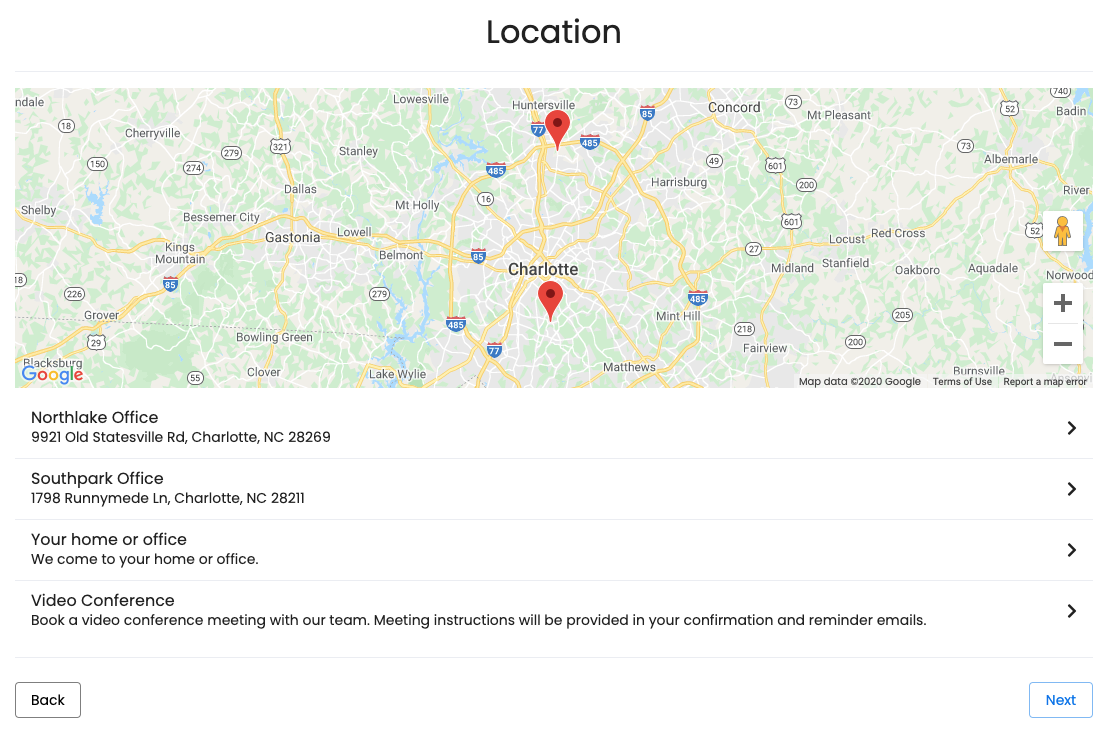
Location Panel on Client Scheduler
If you have upgraded to a TimeTap Team subscription, then you have the ability to add multiple locations to your account. As soon as you add multiple locations, you can also customize the Client Scheduler's panel flow so that clients can select which location they want to schedule an appointment at as they are booking.
No matter if you meet with clients in person or over the phone, you'll likely want to provide some details around where the meeting is going to take place. It may be that you want to make sure your Skype Username is conveyed clearly to the client, or it may be that you want to make sure that you client has instructions on how to enter your building. It also may be that you plan on calling the client on the phone at the start time of the appointment and thus you don't really want the location to show up at all.
Whatever your rationale, knowing where clients will see your location information in the booking process is the first step toward making sure everything about the appointment gets communicated clearly.
What is displayed on this panel of the scheduling flow is the location name as well as the location address (for office locations) or location description (for virtual locations). You can edit these 2 fields (the Address field for physical locations and the Description field for virtual locations) from the location's profile and they will update what gets displayed on your scheduler.
The only locations that will show up on this page are locations that either have service availability set up for a certain staff or have a class schedule set for them. If you do not see a location on this page, it is because no classes are being offered there and no staff have hours set up at the location to offer services, so clients can't book any appointments there.
Appointment Confirmation Panel
Once a client has finished booking an appointment, they get presented with a brief confirmation summary of their appointment details. The summary for the appointment location on this page by default reads "Location: %LOCATION_NAME%".
You can find where you can edit this confirmation summary/appointment success message under Settings > Final Confirmation -
You can learn more about editing this success message specifically by reading our documentation on the Final Confirmation message here. You can also learn about how to use all those funny-looking percentage sign names (called email tags) by reading our documentation on our email tags here.
- New Appointment by Client
- New Appointment by Staff
- New Recurring Appointments by Staff
- Appointment Edited/Rescheduled
You'll see where this text appears on the New Appointment email shown below-
If you want to change how this shows up in your email templates, simply edit the location details in your location profile.
Appointment Detail Page
In the email templates that get sent to clients for appointment confirmations, appointment reminders or rescheduling, there's a link they can access to cancel or reschedule their appointment.
If a client clicks on the link, they will be directed to the Appointment Detail page on your mini website. That page lists the details around the appointment as well as provides buttons to either reschedule or cancel the appointment.
As you can see in the image below, the location name displays on this page as well. To change how the location name displays here, you would need to change the Location Name field on the location profile, which would affect how it gets displayed everywhere.
Learn more about your locations -