Both our Professional and Business plans have tools that will enhance your and your clients' online booking experience. If you are currently on the TimeTap Professional plan, you can upgrade to TimeTap Business at any time.
In this help doc we'll cover -
- What is the cost of TimeTap Professional? How will I get billed for it?
- What is the cost of TimeTap Business? How will I get billed for it?
- What specific features will I get from TimeTap Professional?
- What specific features will I get from TimeTap Business?
- What counts as a staff person? How will I get charged for them?
- What if my staff members all offer different availability for appointments?
- How do I upgrade to TimeTap Business?
- TimeTap Professional vs TimeTap Business Comparison Chart
- Solo Professional - Includes 1 staff member and 1 location for $28.45/month.
- Team Professional - Includes up to 5 staff members and up to 5 locations for $44.95/month.
For the Team Professional plan, additional staff and locations can be added in bundles of 5 for an extra $17/month. For example, if you need to have 6-10 staff members on your account, the total cost would be $61.95/month.
Free Trial and Account Activation
When you sign up for a free trial of a Professional account, you will have 14 days to test the software. We recommend entering your billing information before the trial ends to avoid temporary suspension of your account. If you do not provide any billing information by the end of the 14-day trial, your account will get suspended automatically - this means you won't be able to accept appointments or make changes to your schedule until you update your billing information. Rest assured, your data will not be deleted, and your account will get fully restored once you enter your credit card details.
Seasonal Use
For users who only need scheduling software on a seasonal basis (such as tax professionals), we offer the option to suspend your account after your season ends and reactivate it the following year so that you won't get charged for the time you're not using TimeTap. This ensures that all your information remains intact, eliminating the need to set up your account from scratch each year.
Billing Cycle
By default, billing is done via credit card on a monthly basis. Your first billing cycle will start on the last day of your 14-day free trial (if you enter your credit card information before the trial ends) or on the day you enter your credit card details (if your free trial ends before you provide billing information). The billing cycle will renew monthly until you cancel or suspend your account.
- Have up to 5 staff on your account. Once you've reached your 5 staff limit, you can purchase another bundle of 5 staff for $17/month more.
- Have up to 5 locations on your account. Once you've reached your 5 location limit, you can purchase another bundle of 5 locations for $17/month more.
With both Professional account types (Solo Professional and Team Professional), you'll get access to these advanced features -
- Text messaging to clients & staff
- 2-way sync for each individual staff person's account with an external calendar
- Edit the email templates that get sent to staff & clients about appointments
- Export appointment lists into Excel and include additional fields
- Export your full client list into Excel
- Unlimited custom fields for clients and appointments
- Unlimited class-based booking
- Ability to print appointment slips
- File Upload
- Dedicated Text Number - You can select your own number from a pool of phone numbers offered and set up a custom response to be sent as a text message notification.
- Vanity URLs - Create vanity URLs to use in place of your private URLs for locations, staff, services, classes, reason groups and location groups. This makes it so you have a friendly link to send to your clients instead of the random alphanumeric combination that typically makes up the private URL.
- Waitlist - Allows clients to sign up for the waitlist for class sessions or services once all seats in the class session are taken or your availability for the service is completely filled.
- Screening Questions - Screening questions are useful in situations where a specific requirement must be met by the client to book an appointment.
- Zip Code Filter - This tool allows your clients to find your closest location or staff member to their current location so that they can book an appointment that's convenient for them.
- Custom Reports for Your Business - Let our support team know what information you want to export to a PDF or Excel spreadsheet and we will build a custom report for you. Business plans get 1 custom report for free, and any additional ones will cost a 1-time fee of $250.
- File Upload Field - Allow your clients to upload files and attach them to their profiles or to the appointments they are booking.
With TimeTap Team Business you can also -
- Have up to 5 staff on your account. Once you've reached your 5 staff limit, you can purchase another bundle of 5 staff for $28.50/month more.
- Have up to 5 locations on your account. Once you've reached your 5 location limit, you can purchase another bundle of 5 locations for $28.50/month more.
- Base Cost - $44.95/month, which includes up to 5 staff members.
- Additional Staff - Add more staff members in bundles of 5 for an additional $17/month.
- For example, 6-10 staff members will cost $61.95/month, and 10-15 staff members will cost $78.95/month.
TimeTap Team Business Plan
- Base Cost - $84.45/month, which includes up to 5 staff members.
- Additional Staff - Add more staff members in bundles of 5 for an additional $28.50/month.
- For example, 6-10 staff members will cost $112.95/month, and 10-15 staff members will cost $141.45/month.
Defining a Staff Member
A staff member is anyone who has a separate username and password to access your TimeTap account. Typically, staff members get added because they need their own schedules to accept appointments. However, there are scenarios where multiple profiles are created for a single location.
For example, a tanning studio owner with 5 rooms may create 5 separate staff profiles to allow clients to book appointments in each room simultaneously.
You can also add office assistants as staff members to your Team Professional or Team Business account. These assistants can access the TimeTap Back Office to manage schedules and check in clients, but do not see clients themselves. In such cases, you can set their Accept Appointments field to Off.
Each staff profile on the account counts towards the total number of staff billed for your account, regardless of if they are set to accept appointments or not.
Adding and Removing Staff Bundles
When you add a staff profile that bumps your account into the next bundle of 5, you will get charged a prorated amount based on the time remaining in your current billing cycle.
You can delete staff members at any time. If you have 6 staff members and delete 1, the additional staff bundle will be automatically removed, and you will no longer get charged for it.
You'll be able to view each staff member's availability individually from their unique staff profile, or you can view them all grouped together from the Location Availability tab on a location profile.
You can customize everyone's schedule on the fly so that their appointment availability is always up to date.
Once on the change plans page you will see all the available plans in TimeTap -
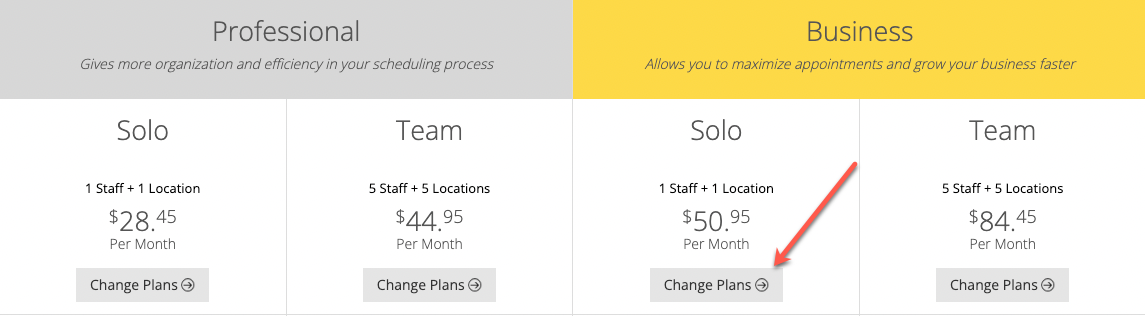
Locate the plan you'd like to upgrade and click on the gray Change Plans button. After that, you're all set - you can now enjoy all the TimeTap Professional or TimeTap Business features!